PowerBI Dashboards for Odoo Data
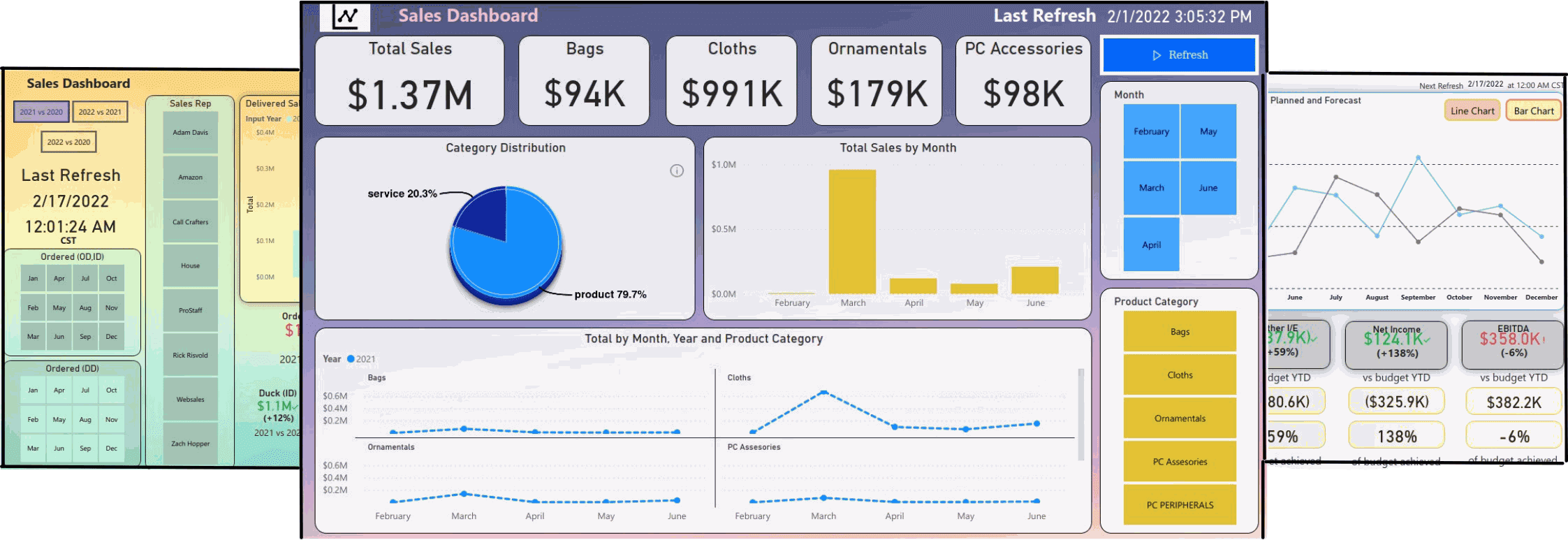
Odoo is a big company with a lot of data to be visualized. How could we make it easy for them? Since Odoo is such a big and complex software, we wanted to make sure our solution was able to be very visual in summarizing the data. The solution involved creating a new dashboard that showed the most important metrics in an easy-to-read view, with interactive charts and tables. Users could even filter which data they wanted to see!
PowerBI is a tool for visualising data. In this article we will see how we can use Power BI to visualise Odoo data.
Why use Power BI?
The latest technology in self-service business intelligence, Power BI puts your data at your fingertips. With a few clicks, you can create interactive reports and dashboards to spot business trends in your data. Quickly publish to a variety of audiences including individual users, groups in your organization, and the Web.
Power BI makes it easy to ask questions and find answers across your company. Collaborate with others in your organization on dashboards you create for everyone to see.
Creating Power BI Dashboards
Dashboard building is a difficult task that needs to be done carefully. Creating good looking Power BI dashboards is a task to be done by hand with the help of tools like report builder, slicers and charts.

Our custom dashboards are designed to best suit your business needs and reflect the look, feel and culture of your company. Let us do the heavy lifting for you by developing a custom dashboard.
We got the solution for you
We provide PowerBI custom dashboards with a high level of customization with our expert team so you get exactly what you need and we make your vision come true.
Want to use our pre-built PowerBI dashboard? Perfect! We've crafted the best looking, most functional and affordable Power BI Dashboard solution on the market.
Budget Sale Dashboard Power BI
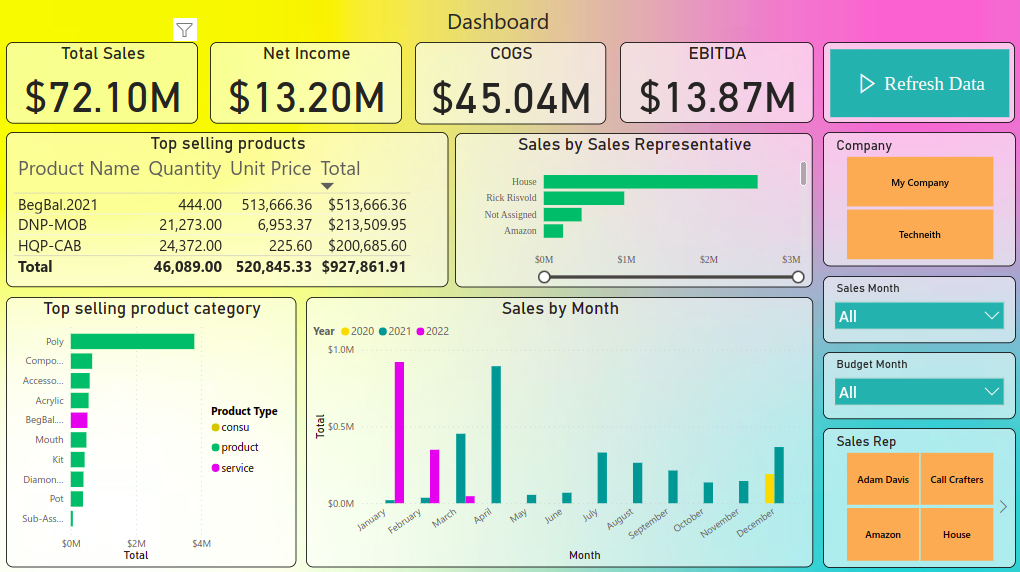
This dashboard helps to understand your company's sales and budget figures on the basis of data available on Odoo. It includes various key elements like Net Income, EBITDA, etc. to understand the budgetary status of the company. Features related to sales and products in the company play a crucial role in understanding the company's needs and in taking decisions accordingly.
Highlights
-
Net Income
Net income is the amount of accounting profit a company has left over after paying off all its expenses.
-
COGS
Cost of goods sold (COGS) also known as 'Cost of Sales' is the cost of acquiring or manufacturing the products that a company sells during a period.
-
EBITDA
EBITDA stands for Earning Before Interest, Tax, Depreciation and Amortization. As the name suggests it is a measure of a company's overall financial performance and is used as an alternative to the net income in some circumstances.
-
Company Slicer
It will affect the whole dashboard and apply the filter of the company as selected. Multiple companies can be selected at a time.
-
Sales Month Slicer
It will apply a month filter on Total Sales, Top selling products, Sales by the Sales representative and Top Selling Product Category. Multiple selections are allowed.
-
Budget Month
It will apply a monthly filter on Net Income, COGS and EBITDA and reflect these terms on the basis of the months selected. The Budget month is based on the date arrived from the Budget module. Multiple selections are allowed.
-
Sales Rep Slicer
It will affect the Top selling product, Sales by the Sales representative and Top Selling Product Category on the basis of the representative selected in the slicer. It allows selecting multiple representatives at a time.
Interested in buying one for your Odoo data? Shop Here 🛒
How to get Odoo data to PowerBI?
We provide solutions to connect your Odoo data to Power BI using our Power BI Odoo connector which is easy to use. Our Power BI connector is the highest selling Power BI connector on the Odoo app store.
Interested? Check our Power BI direct connector on our website
Not what you are looking for?
Are you looking for a dashboard which is not there in Power BI? Do you have a custom need which is not covered by any of the existing dashboards? We at Techneith offer custom made Power BI dashboards. Our team will take care of your requirement and give you what you want.
You've come to the right place. Our experienced Power BI expert team will help you deliver custom business intelligence that has never been seen before, contact us at info@techneith.com